Lead data review · Lists, contact info and driving for dollars

BatchLeads Review: Lead Lists With Phone Numbers Included for Wholesalers

A lead list tool where owner phones and emails come with every saved lead, three users start on the base plan, and list stacking is built in. Good value if you call and text your own lists; reviewers say the numbers still need cleaning.

Free bonus

BatchLeads List-Stacking Cheat Sheet + Deal Analyzer Spreadsheet when you sign up through my link. See what's in it and how to claim it

Quick answer

BatchLeads is a real estate lead list tool for investors and wholesalers. You build lists from 100+ filters, stack them, and every saved lead comes with available owner phones and emails. Plans start at $119/mo, or $71/mo paid yearly, with three users, and monthly plans have a 7-day free trial. PropStream owns it now.

Best for: Wholesalers who cold call or text their own lists and want phone numbers without a separate skip tracing bill.

Skip it if: People who need a full CRM with pipelines and follow-up. BatchLeads is a list and outreach tool first.

See every plan and price See all features

BatchLeads at a glance

Made by
BatchLeads
Website
batchleads.io
Price
From $119/mo, or $71/mo paid yearly
Free trial
7 days on monthly individual plans
Users
3 on Growth, 8 on Professional, 26 on Scale
Contact info
Owner phones and emails included with saved leads
Leads a month
10,000 on Growth; extra leads 4 cents each
Owner
PropStream, a Stewart company
Fit check

Is BatchLeads worth it? Who it's for and who should skip it

A good fit if you're

  • Wholesalers who cold call or text their own lists and want phone numbers without a separate skip tracing bill.
  • Small teams. Three users come on the base plan, where most list tools charge per seat.
  • Investors who stack lists to find owners with more than one reason to sell.
  • Anyone who drives for dollars and wants the app and the list tool in one place.

Skip it if you're

  • People who need a full CRM with pipelines and follow-up. BatchLeads is a list and outreach tool first.
  • Anyone who wants texting built in on the base plan. SMS runs through outside providers and isn't on Growth.
  • Buyers who expect every number to be right. Reviewers describe the data as hit and miss in places.
  • Anyone who wants to try the yearly price first. The trial is on monthly plans only.
Key features

What does BatchLeads do? Key features

Here's what BatchLeads says each plan does. I haven't run my own campaigns through it, so this is what BatchLeads shows and describes, plus what its users report.

Lead lists

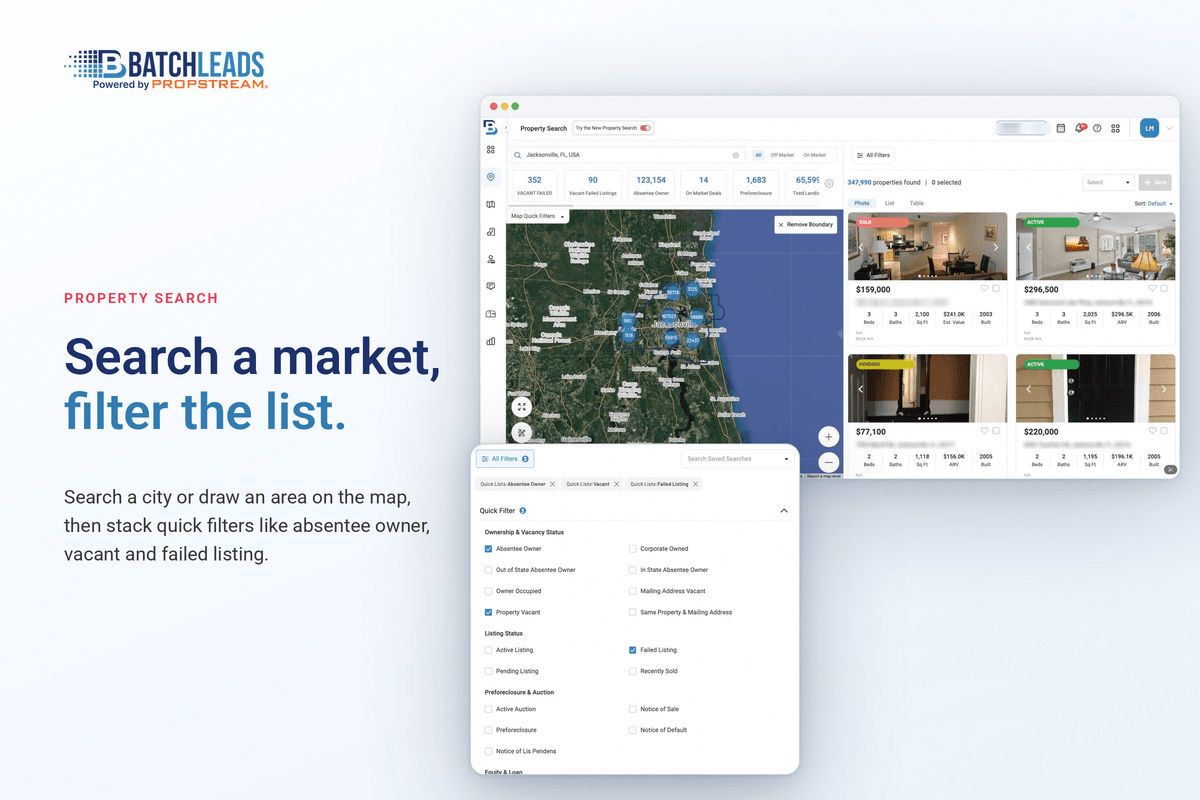
Property search with 100+ filters and quick lists

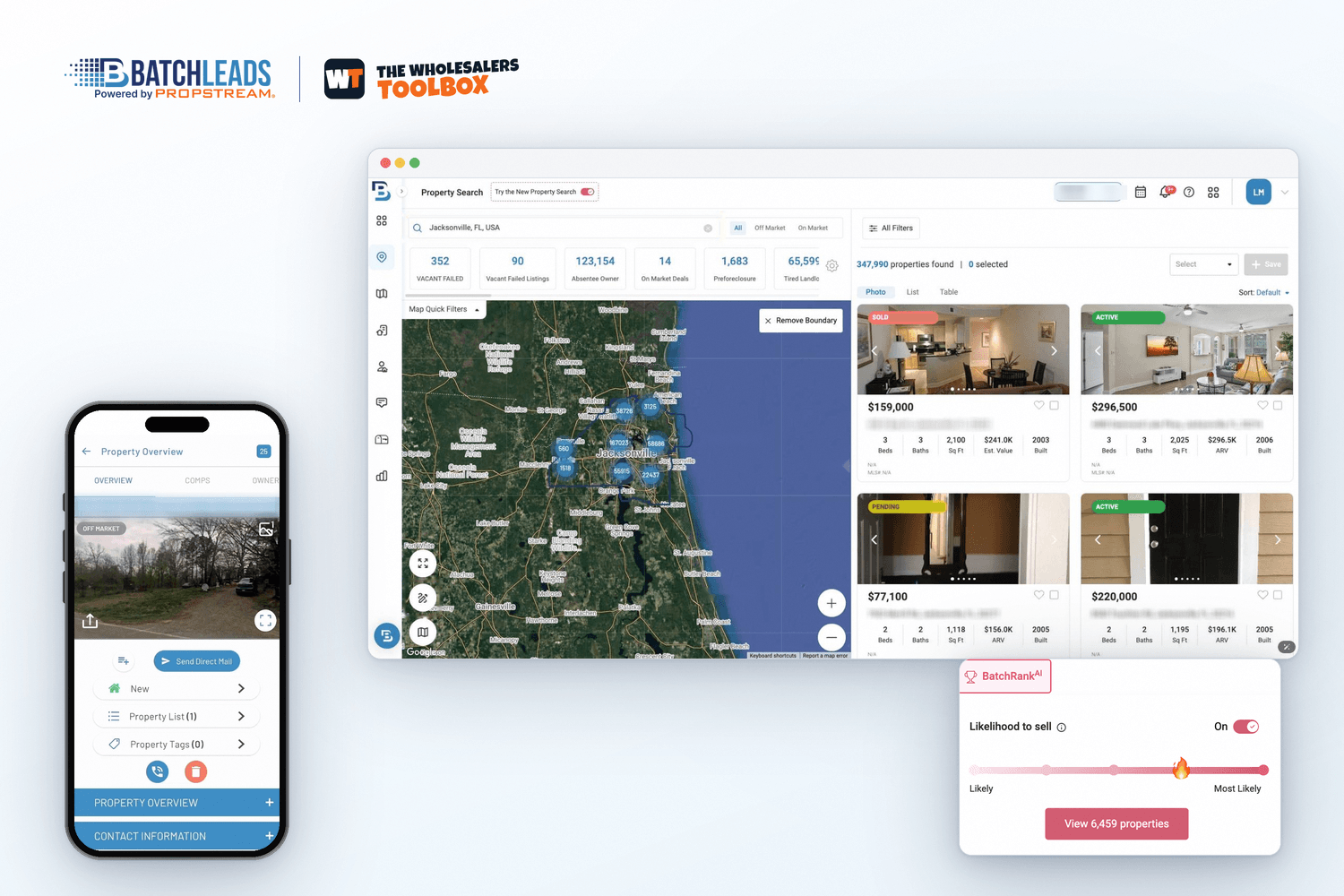
BatchLeads says it covers more than 150 million properties. You search by area and stack filters for property details, MLS status, equity, mortgage type and owner info, or start from one-click quick lists like pre-foreclosures, vacant homes and tired landlords.

The site quotes different filter counts on different pages, so treat 100+ as the safe number. For land, an APN search looks up vacant parcels by their parcel number.

BatchLeads property search map with stacked lead filters and quick list tiles
List stacking

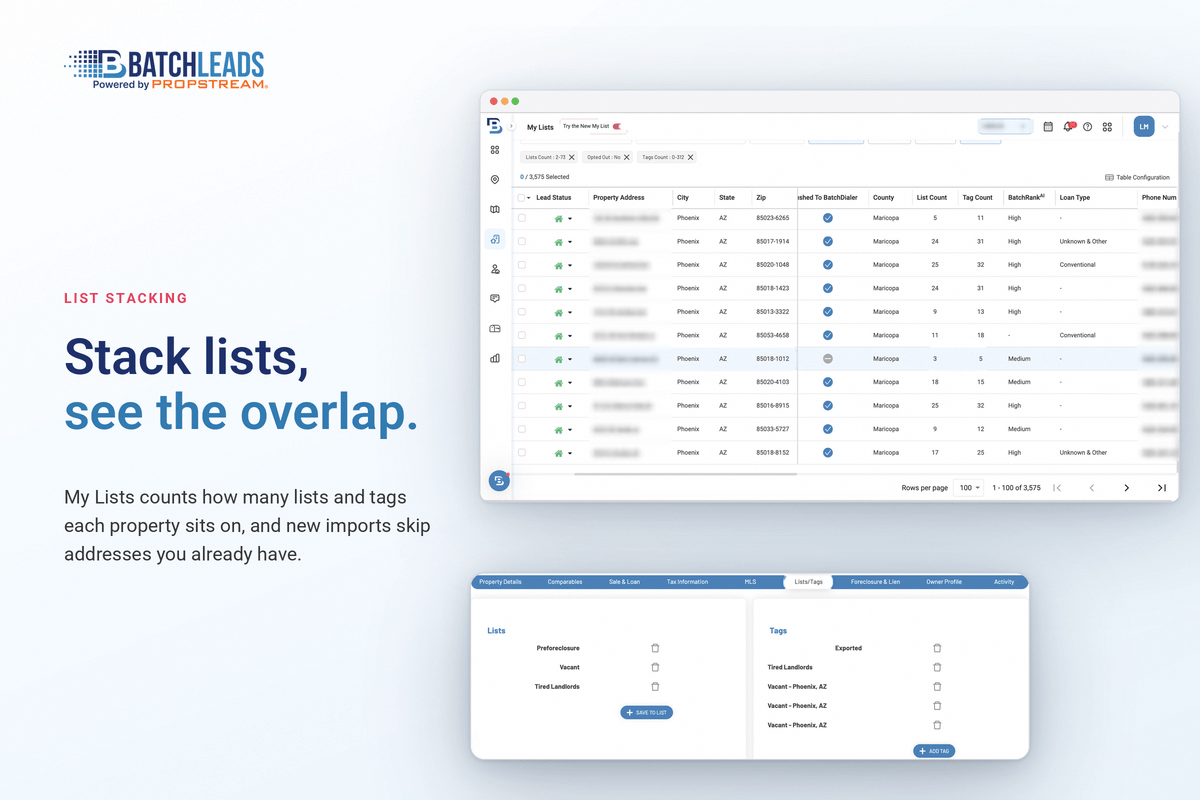
Stack lists to find owners with more than one problem

Upload your own lists or save searches, then stack them to see which owners land on two or more lists, remove duplicates, tag them and start a campaign.

Uploaded records get filled in with owner and property data, but they count against your monthly lead limit.

BatchLeads list stacking screen showing owners who appear on several lists
Contact info

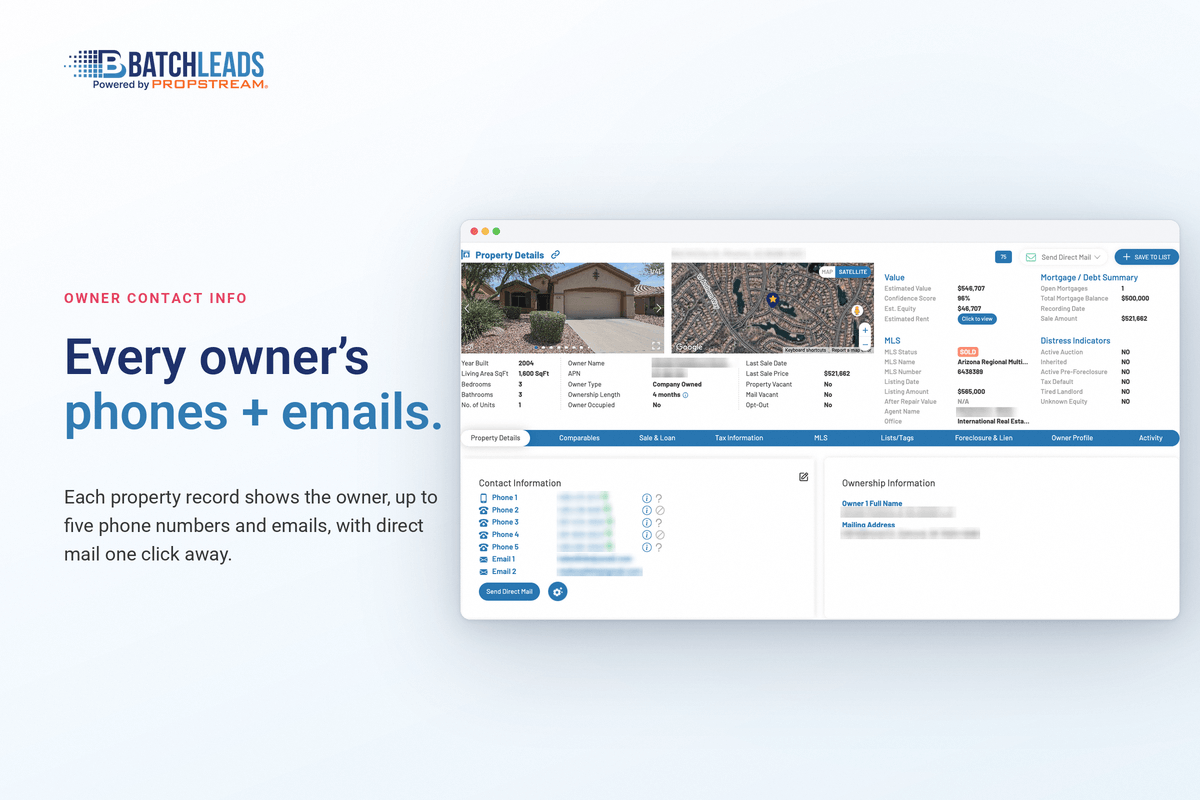
Owner phones and emails included with saved leads

When you save a property to a list, BatchLeads adds the owner phone numbers and emails it has. Growth includes 10,000 leads a month, and extra leads cost 4 cents each.

That's the main reason people pick it over tools that charge for each skip trace. Each number carries a Phone Score that rates how likely it is to be right, and reviewers say accuracy is hit and miss in places, so plan to scrub and clean.

BatchLeads property profile with the owner's phone numbers and emails
Driving for dollars

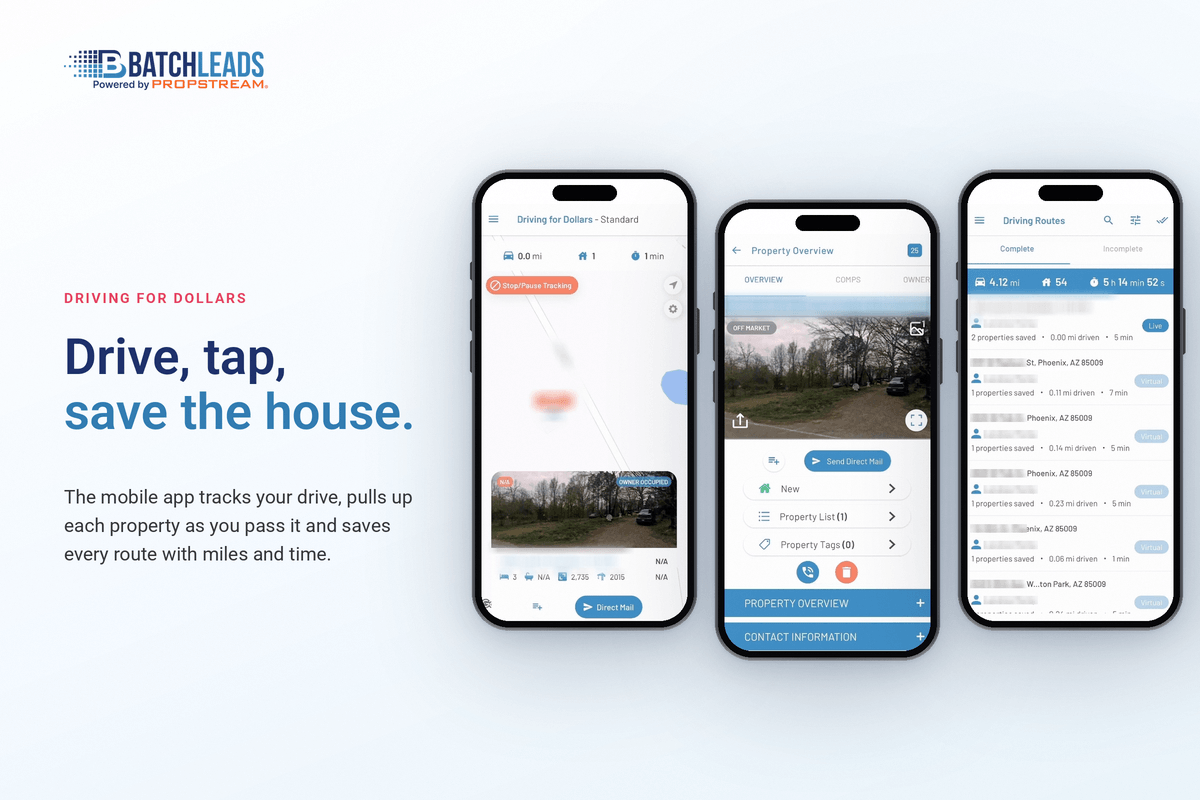
Mobile app and virtual driving for dollars

The iOS and Android app tracks your driving routes, saves properties with notes and photos, and pulls owner contact info on the spot.

Virtual driving for dollars lets you canvass streets from your desk and follow up on the routes you drove.

BatchLeads mobile app showing a driving for dollars route with saved properties
Comps and buyers

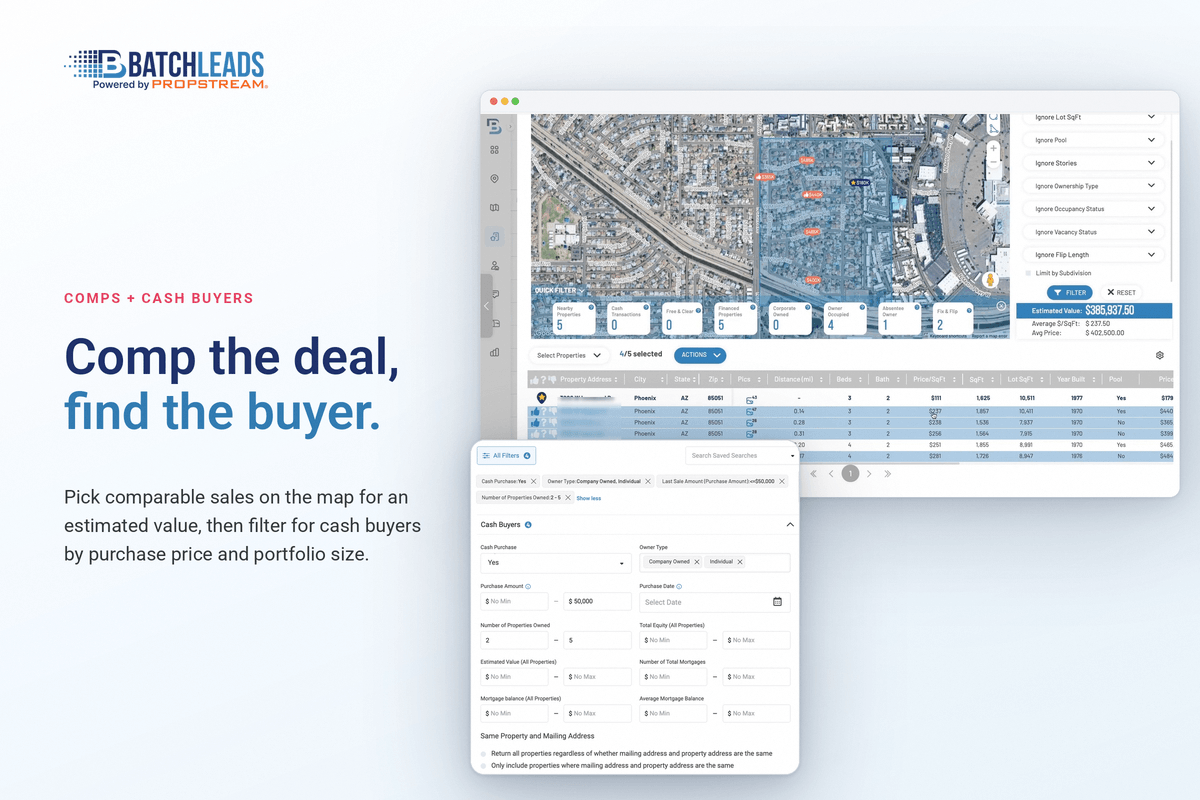
Comps, rental estimates and cash buyer search

Each property profile has a comps tab where you draw your own area and filter by type, age and sale date, plus rent estimates and print-ready comp reports.

Cash investor search shows who has bought nearby with cash or hard money. The advanced buyer filters start on Professional.

BatchLeads comparable sales tab drawn on a map around a property
Outreach and AI

Direct mail, Dialer AI and BatchRank AI

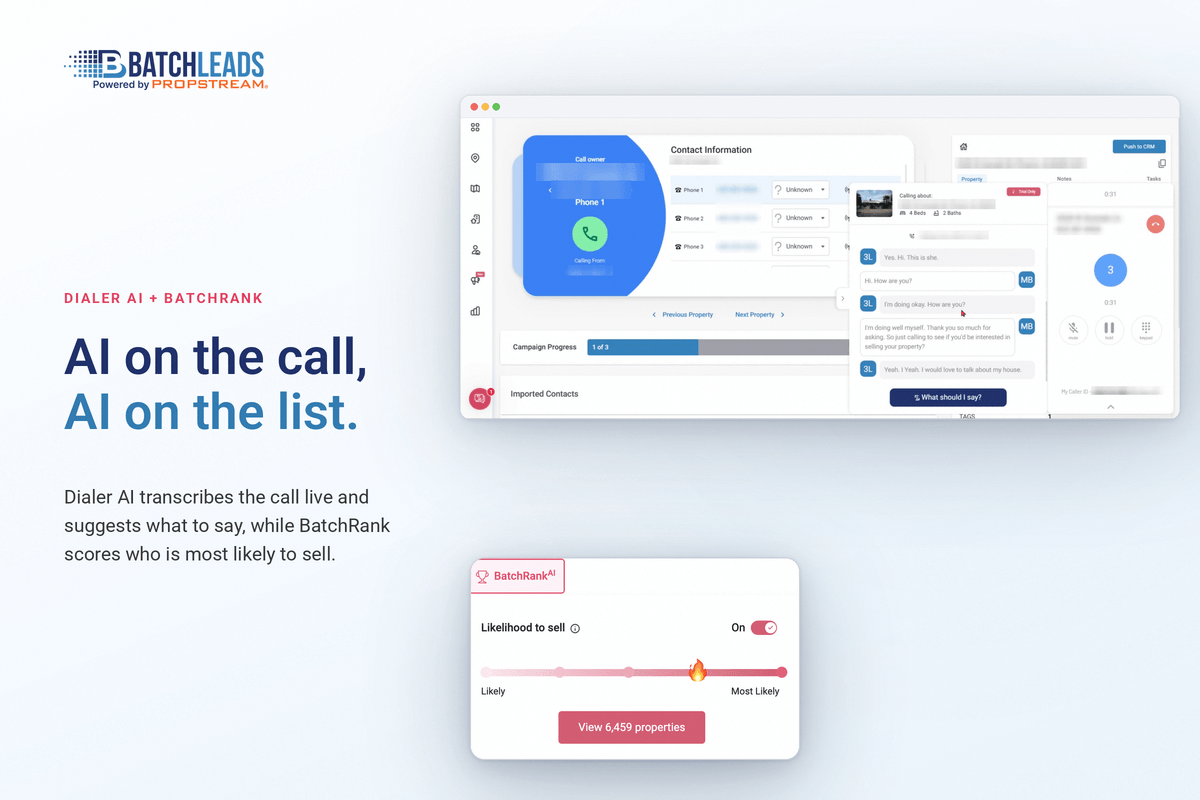
You can send letters and postcards from your lists, printing and postage included: 4x6 postcards are 58 cents on Growth and 55 cents on Professional and Scale. The pricing page also lists Click-to-Dial for calling owners from inside BatchLeads, and Dialer AI is an $89/mo add-on with an in-app softphone and live AI prompts.

Reia AI is a $19/mo assistant with unlimited use that also works in the mobile app. BatchLeads says it gives repair estimates and suggests exit strategies for a property.

BatchRank AI scores which homes look most likely to sell. Growth gets a limited version; Professional and Scale get the full scores. You can pick an Off Market strategy and leave out addresses USPS hasn't verified.

BatchLeads Dialer AI call screen with property details and AI talking prompts

Every feature, grouped by job

Find leads

  • 100+ filters and list stackingBuild lists by equity, absentee, vacancy, tax default and more, then stack them and remove duplicates.
  • BatchRank AIScores which homes look likeliest to sell. Limited on Growth, full on Professional and up, with an Off Market strategy option.
  • APN land searchLook up vacant parcels by parcel number for land and tax-sale lists.
  • Agent OutreachFind agents by listing, sold and expired counts, with license number, phone and email.
  • Unlimited storageSaved addresses don't count against a storage cap.

Get owner contact info

  • Phones and emails includedAvailable owner contact info comes with each saved lead, inside your monthly lead limit.
  • Phone ScoreEach number is scored for how likely it is to reach the owner.
  • Compliance toolsTexting campaigns are scrubbed against a litigator list. Skip traces aren't scrubbed against the National DNC list.

Reach owners

  • Direct mailLetters and postcards with printing and postage included, cheaper per piece on Professional and Scale.
  • Click-to-Dial and Dialer AICall from inside BatchLeads. Dialer AI ($89/mo) adds a softphone with live AI prompts.
  • TextingThrough Twilio, Plivo, SignalWire, Flowroute or Telnyx after approval; Professional and up.
  • Driving for dollarsiOS and Android app with routes, notes and photos, plus virtual driving for dollars.

Analyze deals and find buyers

  • Comps and rent estimatesDraw your own comp area, filter by type, age and sale date, and print comp reports.
  • Free deal calculatorsFix-and-flip, BRRRR and rental calculators.
  • Reia AIA $19/mo assistant for repair estimates and exit strategies, in the app too.
  • Cash buyer searchFind buyers for your deals; the advanced search is on Professional and up.

Run your team and tools

  • Users included3 users on Growth, 8 on Professional, 26 on Scale.
  • IntegrationsNative Podio, Twilio and BatchDialer sync; Zapier to Follow Up Boss, HubSpot, Pipedrive, Salesforce, Close and more.
  • Free first-month migrationUnlimited imports in your first paid month if you move from PropStream or DealMachine.

Learn and get help

  • TrainingTraining courses, monthly webinars, live sessions and interactive demos.
  • CommunityThe BatchService REI Slack group.
  • SupportMonday to Friday, 6am to 6pm Arizona time; priority support on Professional and up.

Compare plans and prices

Fit by role

Which BatchLeads features matter for your role

The same account gets used very differently depending on how you find deals. Here's where to look first.

Wholesalers

Quick lists plus list stacking, then owner phones on saved leads, the Phone Score and the dialer or mail tools. Most of the plan's value sits here.

Drivers for dollars

The mobile app logs your routes, notes and photos and pulls owner info on the spot. Virtual driving for dollars covers streets you can't get to.

Land buyers

APN search looks up vacant parcels by number, so you can match a county tax or land list to owners.

Flippers and landlords

The comps tab, rent estimates and the fix-and-flip, BRRRR and rental calculators give you a first pass before a walkthrough.

Agents and agent-facing wholesalers

Agent Outreach finds agents by listing, sold and expired counts, with license number, phone and email.

Small teams

Three users on Growth, eight on Professional and 26 on Scale, so you can add callers without paying per seat.

Pricing

How much does BatchLeads cost? Pricing and plans

BatchLeads has three self-serve plans plus Enterprise. Every plan includes owner contact info on saved leads; the jump is in leads, exports, users, AI scoring and mail rates. Here's each plan, its limits, and what costs extra.

Growth

$119/mo

Billed monthly, or $71/mo paid yearly ($857/yr). 7-day trial on monthly.

What you get

  • 3 users
  • Owner phones and emails on saved leads
  • 100+ filters, list stacking and dedupe
  • Mobile app and driving for dollars
  • BatchRank AI (limited)

Limits

  • 10,000 leads and 20,000 exports a month
  • No lead scoring or SMS integration
  • Mail: letters 81 cents, 4x6 postcards 58 cents

Best for: Solo investors and small teams getting started.

Professional

$349/mo

Billed monthly, or $209/mo paid yearly. 7-day trial on monthly.

What you get

  • Everything in Growth
  • 8 users
  • Full BatchRank AI and lead scoring
  • SMS integration
  • Advanced cash buyer search
  • Priority support

Limits

  • 35,000 leads and 70,000 exports a month
  • Mail: letters 79 cents, 4x6 postcards 55 cents

Best for: Teams calling and texting every day.

Scale

$749/mo

Billed monthly, or $449/mo paid yearly. 7-day trial on monthly.

What you get

  • Everything in Professional
  • 26 users
  • Biggest discounts on in-app purchases

Limits

  • 75,000 leads and 150,000 exports a month

Best for: Larger teams with several callers.

Enterprise

Custom

Annual contracts only. Contact sales.

What you get

  • Everything in Scale
  • Dedicated account manager
  • Flexible seats and export limits

Limits

  • Up to 1,000,000 leads a month

Best for: High-volume operations.

Prices can change, so check their site.

Add-ons and usage costs

ItemCostNotes
Dialer AI$89/moIn-app softphone with live AI prompts, flat rate, 3 numbers
Reia AI$19/moAI assistant, unlimited use, works in the mobile app
Extra leads or exports4 cents eachRecords you upload count against your monthly lead limit
4x6 postcard58 / 55 centsGrowth / Professional and Scale; printing and postage included
Letter81 / 79 centsGrowth / Professional and Scale
6x9 postcard64 / 63 centsGrowth / Professional and Scale
TextingSee your providerBilled by your own SMS provider, not BatchLeads
  • Changing plans: upgrades are prorated, downgrades start at your next billing cycle, and annual plans can be paid by ACH.
  • Yearly plans: about 40% off, paid up front, no trial, and they renew automatically unless you cancel before the anniversary.
  • Cancelling monthly: you can cancel any time and won't be charged the next month, but there are no partial refunds for the month you're in. Their terms add a 72-hour refund window after a purchase or renewal, only if you haven't used the service.

Does BatchLeads have a free trial?

Yes. BatchLeads has a 7-day free trial on monthly individual plans, and the trial page offers 100 free leads with contact info. It bills automatically when the trial ends. The yearly prices start right away, with no trial.

Beyond the plan price

What BatchLeads really costs: the extras that aren't in the headline price

The plan price is only part of the bill. Here's what changes between Growth and the higher plans, and what a real month can cost, from BatchLeads' own pricing page.

ItemGrowthProfessional and Scale
4x6 postcard58 cents55 cents
Letter81 cents79 cents
6x9 postcard64 cents63 cents
Lead scoringNot includedIncluded
SMS integrationNot includedIncluded (outside provider and carrier registration needed)
BatchRank AILimited versionFull scores
Advanced cash buyer searchNot includedIncluded
Priority supportNot includedIncluded

Three sample monthly budgets

These are simple sums from the published prices, before any overage or texting provider fees:

Solo caller

Growth $119 + Dialer AI $89 = $208/mo. Paid yearly, Growth drops to $71/mo, so about $160/mo with the dialer.

Mail-first investor

Growth $119 + 1,000 4x6 postcards at 58 cents ($580) = about $699/mo. On Professional, the same mail costs $550.

Calling team

Professional $349 + Dialer AI $89 = $438/mo for eight users, lead scoring and SMS integration.

My advice: start on monthly Growth during the trial, and only move up if you actually need lead scoring, texting or more callers. Mail volume is the one place the higher plans save real money per piece.

Pros and cons

BatchLeads pros and cons

Pros

  • Owner phones and emails come with every saved lead, inside your monthly limit.
  • Three users on the base plan, where most list tools charge per seat.
  • List stacking and dedupe are built in, and lead scoring comes with Professional and up.
  • Driving for dollars app and virtual driving for dollars on every plan.
  • App Store reviewers single out the driving for dollars app and how easy it is to use.
  • A 7-day trial on monthly plans, plus free unlimited imports in your first paid month if you're switching.

Cons

  • Reviewers say contact data can be hit and miss, so expect to clean numbers.
  • Texting needs an outside provider and approval, and isn't on Growth.
  • The AI dialer is an extra $89/mo, and the best AI scoring starts at $349/mo.
  • Not a full CRM; you'll want a separate one to manage sellers.
  • Skip traced results aren't scrubbed against the National Do Not Call list, so call compliance is on you.
Data, support and compliance

BatchLeads data, DNC scrubbing and support: the questions people ask

Where does BatchLeads get its data?

Its help center says the data comes from credit bureaus, MVD records and other sources, layered on property records for more than 150 million properties. The site quotes slightly different property and filter counts on different pages, so treat the lower numbers as the safe ones.

How accurate are BatchLeads phone numbers?

No tool gets every number right. BatchLeads gives each number a Phone Score for how likely it is to reach the owner, and App Store reviewers call the accuracy hit and miss in places. Call the high scores first and test addresses you know during the trial.

Does BatchLeads scrub for Do Not Call?

Not on skip traced results. Its help center says those aren't scrubbed against the National Do Not Call database, so check the list yourself before you cold call. Texting campaigns are scrubbed against a litigator list. This isn't legal advice; check the calling rules where you work.

What do I need before I can text sellers?

An account with an outside provider such as Twilio, Plivo, SignalWire, Flowroute or Telnyx, approval from BatchLeads, and carrier registration for business texting. SMS integration isn't on Growth, so you need Professional or higher.

Is BatchLeads a CRM?

Not a full one. It has campaigns, tags and pipelines for leads, but it's built as a list and outreach tool. It connects natively to Podio and through Zapier to CRMs like Follow Up Boss, HubSpot, Pipedrive and Salesforce.

When is BatchLeads support open?

Monday to Friday, 6am to 6pm Arizona time, per the pricing page. Professional and higher get priority support, and every plan gets training courses, monthly webinars, live training and the BatchService REI Slack community.

Is BatchLeads good for beginners?

It's easier to learn than most list tools, going by its App Store reviews, and the training is included. My advice for a beginner: use the trial to build one stacked list in one zip code and work it fully before you pay for more data than you can call.

What users say

BatchLeads reviews: what users say

Here's what BatchLeads users say in public reviews, copied word for word with links so you can read the rest yourself. Most of it is positive. The fair criticism, on data accuracy, is in here too.

Public user reviews, quoted word for word. Tap a source to read the full post.

“The driving for dollars part is my favorite part of this app. It’s so simple to use.”
JudgeBrownApp Store reviewApple App Store
“Recently switched over to the BL team from DealMachine, and immensely loving the experience!”
8FiMystqApp Store reviewApple App Store
“Easier to use than prop stream! Excellent software!”
BTCbradyApp Store reviewApple App Store
“Good updates, useful for data and comping in most markets”
Frankly EApp Store reviewApple App Store
“Batchleads has worked well for me with new skiptracing included”
u/blacksmith3951r/WholesaleRealestateReddit
“Mostly a great tool. The data accuracy is kinda hit and miss. It beats manually searching thru records online.”
Hep-B 😜App Store reviewApple App Store

How these were picked: every quote is copied word for word from a page you can open, with the reviewer's name or handle as shown. I left out reviews posted by BatchLeads staff, a burst of reviews that looked solicited, and star scores from review sites I couldn't open and check myself.

The one theme worth planning for: data accuracy. Test the owner names and phone numbers on addresses you already know before you trust a whole list.

Alternatives

BatchLeads alternatives: BatchLeads vs PropStream vs DealMachine

BatchLeads' closest rivals are other list and data tools. Here's how they line up on the basics, from each company's own site.

ToolBest forStarting priceFree trialUsers on the base planContact info
BatchLeadsLists with contact info included and several users$119/mo, or $71/mo paid yearlyYes, 7 days on monthly plans3Included with saved leads
PropStreamDeep filters and comps$99/mo, or $81/mo billed yearlyYes, 7 days with 50 free leads1 (extra seats $30/mo)Free with Connect (Pro and Elite)
DealMachineDriving for dollars and simple list building from your phonePer-seat plans with monthly data credits; see their siteCheck their site1 seat on BasicIncluded through data credits
XleadsLists, CRM, dialer and dispo in one cheaper bundle$97/mo, or $81/mo billed yearlyNot on their site; 24-hour refund windowCheck their siteIncluded, up to 25,000 records a month on Basic

Prices and plans can change, so check each site.

  • Pick BatchLeads if you call and mail your own lists, want numbers included, and have a small team.
  • Look at PropStream if comps and the deepest filters matter more than seats. Same parent company now.
  • Look at DealMachine if driving for dollars is your main lead source. Read my DealMachine review.
  • Working tax-delinquent lists? Read my Tax Delinquent Blueprint review.
  • Need buyers for the deals you find? Read my InvestorBase review.

More reviews: DealMachine review · InvestorBase review · Tax Delinquent Blueprint review · All tools on The Wholesalers Toolbox

Head to head

BatchLeads vs PropStream, PropertyRadar, REsimpli and other tools

Quick takes on the comparisons people search for most, from each company's own pricing page.

BatchLeads vs PropStream

Same parent company now, but separate products, logins and prices. PropStream starts at $99/mo for one user and charges for skip tracing unless you add Connect. BatchLeads starts at $119/mo with three users and contact info on saved leads. Both have 7-day trials.

BatchLeads vs DealMachine

DealMachine uses per-seat plans with monthly data credits and is built around driving for dollars from your phone. BatchLeads has a driving app too, but its strength is list stacking and outreach at volume. Read my DealMachine review.

BatchLeads vs BatchDialer

Not rivals: same company. BatchDialer is the power dialer, and BatchLeads syncs with it natively. If you only want calling inside BatchLeads, the $89/mo Dialer AI add-on covers that.

BatchLeads vs PropertyRadar

PropertyRadar Solo is $119/mo, or $99/mo prepaid yearly, for one user with 250 phones and emails a month, a 5-day free trial and API access. BatchLeads gives three users and 10,000 leads with contact info at the same monthly price.

BatchLeads vs REsimpli

Different jobs. REsimpli is an all-in-one CRM for running your leads and deals, from $249/mo billed yearly on its Solo plan, with a 14-day trial. BatchLeads finds and contacts owners. Plenty of investors pair a list tool with a CRM.

BatchLeads vs BatchData

BatchData is a data API for developers and larger companies, starting at $1,000/mo with an annual commitment. If you want to search, stack and call lists yourself, BatchLeads is the product, not BatchData.

BatchLeads vs Propwire

Propwire says its property search is 100% free, covering about 157 million properties, with an app that can skip trace owners. It's a good free way to start. BatchLeads costs money but adds contact info on saved leads, list stacking, mail, dialing and team seats.

BatchLeads vs Xleads

Xleads bundles lists, skip tracing, a GoHighLevel CRM and a dialer from $97/mo, but its pricing page shows no trial and a very short refund window. BatchLeads has a 7-day trial on monthly plans and far more public reviews.
Getting started

How to get started with BatchLeads

  1. Start the trialPick a monthly plan through the trial page. You get 7 days and 100 free leads with contact info.
  2. Test your own marketLook up addresses you know and check owner names, equity and phone numbers before you trust a list.
  3. Build one stacked listStack two lists in one zip code, remove duplicates, and save only what you'll call or mail this week.
  4. Decide before day sevenSwitch to yearly if it fits, or cancel before the trial bills. Put the date on your calendar.
Free bonus

Free bonus when you sign up for BatchLeads through my link

A short quick-start kit from me, not from BatchLeads: a one-page guide to stacking lists, plus a simple spreadsheet for running the numbers on the leads that answer.

BatchLeads List-Stacking Cheat Sheet + Deal Analyzer Spreadsheet

  • Which lists to stack first for wholesaling, such as absentee plus high equity, or vacant plus tax default
  • How to remove duplicates and filter out owners you shouldn't contact before you call or mail
  • How to tag stacked leads so you know which list combination brought in each conversation
  • A deal analyzer spreadsheet: ARV, repairs, your fee and a maximum offer, with the formulas shown
  • A short checklist for testing the data on addresses you know during the trial
  1. Enter your email in the form.
  2. I'll open BatchLeads in a new tab. Sign up there through my link.
  3. Your bonus arrives by email.

Get the bonus

Enter your email. I'll email you the bonus and take you to BatchLeads.

Paid link. The bonus is free, no spam, unsubscribe anytime.

FAQ

BatchLeads FAQ: common questions

Is BatchLeads worth it?

It can be if you call, text or mail your own lists and want owner phone numbers without a separate skip tracing bill. Three users on the base plan help small teams. If you need a full CRM or mostly sell deals, it isn't the whole answer, and you should expect to clean some numbers.

How much does BatchLeads cost?

BatchLeads Growth is $119/mo, Professional $349/mo and Scale $749/mo, billed monthly. Paid yearly up front, they drop to about $71, $209 and $449 a month. Enterprise is custom. Dialer AI is $89/mo extra, Reia AI $19/mo, and extra leads cost 4 cents each.

Does BatchLeads have a free trial?

Yes. BatchLeads offers a 7-day free trial on monthly individual plans, and its trial page offers 100 free leads with contact info. It bills automatically when the trial ends. Yearly plans start right away without a trial, and team plans go through sales.

Does BatchLeads include skip tracing?

Yes. When you save a property to a list, BatchLeads adds the owner phone numbers and emails it has, and that counts against your monthly lead limit: 10,000 on Growth. Each number has a Phone Score, and reviewers say accuracy varies, so plan to scrub your list before you call.

Can I text sellers from BatchLeads?

Only through an outside SMS provider such as Twilio, Plivo, SignalWire, Flowroute or Telnyx, after BatchLeads confirms you're eligible and you finish carrier registration. Their compare table shows SMS integration isn't on Growth. Set up the provider before you rely on texting.

Is BatchLeads owned by PropStream?

Yes. PropStream, a company in the Stewart family, bought BatchLeads and BatchDialer. The products still run separately, with their own logins and subscriptions, so a BatchLeads account doesn't give you PropStream, and pricing is set separately.

BatchLeads vs PropStream: which is better?

BatchLeads starts at $119/mo with three users and contact info included on saved leads. PropStream starts at $99/mo for one user and is known for deeper filters and comps. Both have 7-day trials, so test both on the same zip code and compare the phone numbers you get.

Does BatchLeads have a mobile app for driving for dollars?

Yes. Every plan includes the BatchLeads mobile app for iOS and Android. It tracks your driving routes, saves properties with notes and photos, and shows owner contact info. Virtual driving for dollars lets you canvass streets from your computer too.

Can I cancel BatchLeads any time?

Monthly plans can be cancelled any time, and you won't be charged the next month, but BatchLeads doesn't give partial refunds for the month you've paid. Their terms allow a refund request within 72 hours of a purchase or renewal only if you haven't used the service. Yearly plans renew automatically unless you cancel before the anniversary of your signup.

Have you used BatchLeads yourself?

No. I haven't run my own campaigns through BatchLeads, so this review is built from BatchLeads' site, pricing and trial page, plus public reviews on the App Store and Reddit. I'm telling you up front so you can weigh it, and so you use the trial to test it yourself.

Bottom line

BatchLeads review: the bottom line

BatchLeads is a strong pick if you want lead lists with owner contact info included, three users on the base plan and a 7-day trial to test the data first. Mail is cheaper per piece on the higher plans, and lead scoring and texting start at Professional.

It's a weaker fit if you need every number to be right or want a full CRM. Plan to scrub your lists, check DNC yourself, and start on monthly Growth before you commit to a year.

Test BatchLeads on your own market

Seven days is enough to build one stacked list, check the numbers on addresses you know, and make a few calls. Decide before the trial bills.

Start the BatchLeads trial

Disclosure: some links on this page are paid links. If you sign up through them, The Wholesalers Toolbox may be paid, at no extra cost to you. It doesn't change what I write.

Not financial or legal advice. This review is for education. David Frizzell is a real estate wholesaler, not an attorney or financial advisor. Check any tool's current terms and your local laws before you buy or make offers.

Free download

Free wholesaling contract pack

Wholesaling contract templates, free. Enter your email and the pack lands in your inbox.

Free. Unsubscribe anytime. After you sign up I'll open BatchLeads in a new tab (paid link).

BatchLeads List-Stacking Cheat Sheet + Deal Analyzer Spreadsheet

Free bonus with BatchLeads

Get my free BatchLeads List-Stacking Cheat Sheet + Deal Analyzer Spreadsheet

Enter your email and I'll send your list-stacking cheat sheet and deal analyzer spreadsheet — then I'll take you to BatchLeads.

Paid link. The bonus is free, no spam, unsubscribe anytime.

No thanks, just take me to BatchLeads ↗