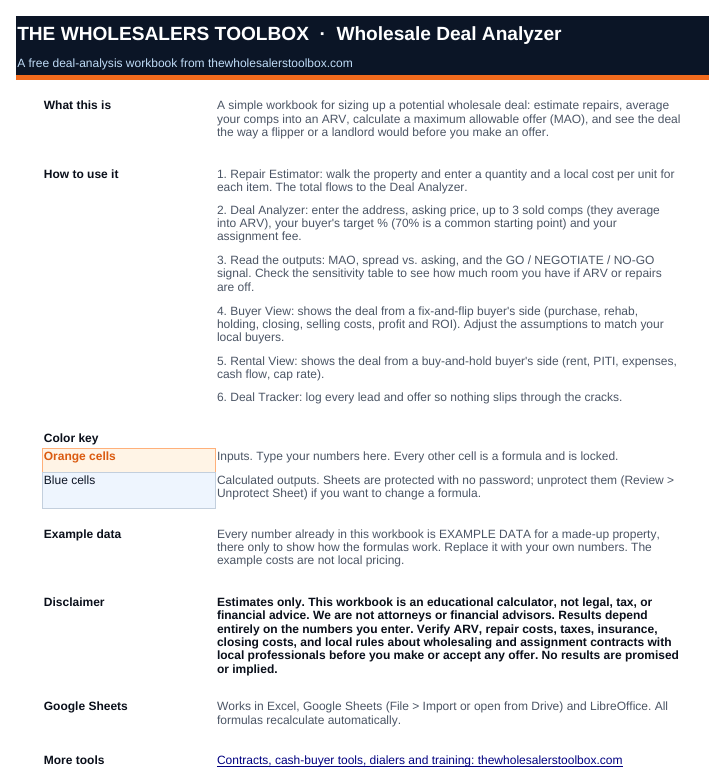
1Start Here
How to use it, a color key for inputs and outputs, and the disclaimer.
Comps → ARV → repairs → MAO, plus how a flipper and a landlord will see the same deal.
Get the free Deal Analyzer
Enter your name and email and I'll send you the spreadsheet.
A copy is on its way to . If it isn't in your inbox in a few minutes, check your spam folder.
Download the spreadsheet (.xlsx)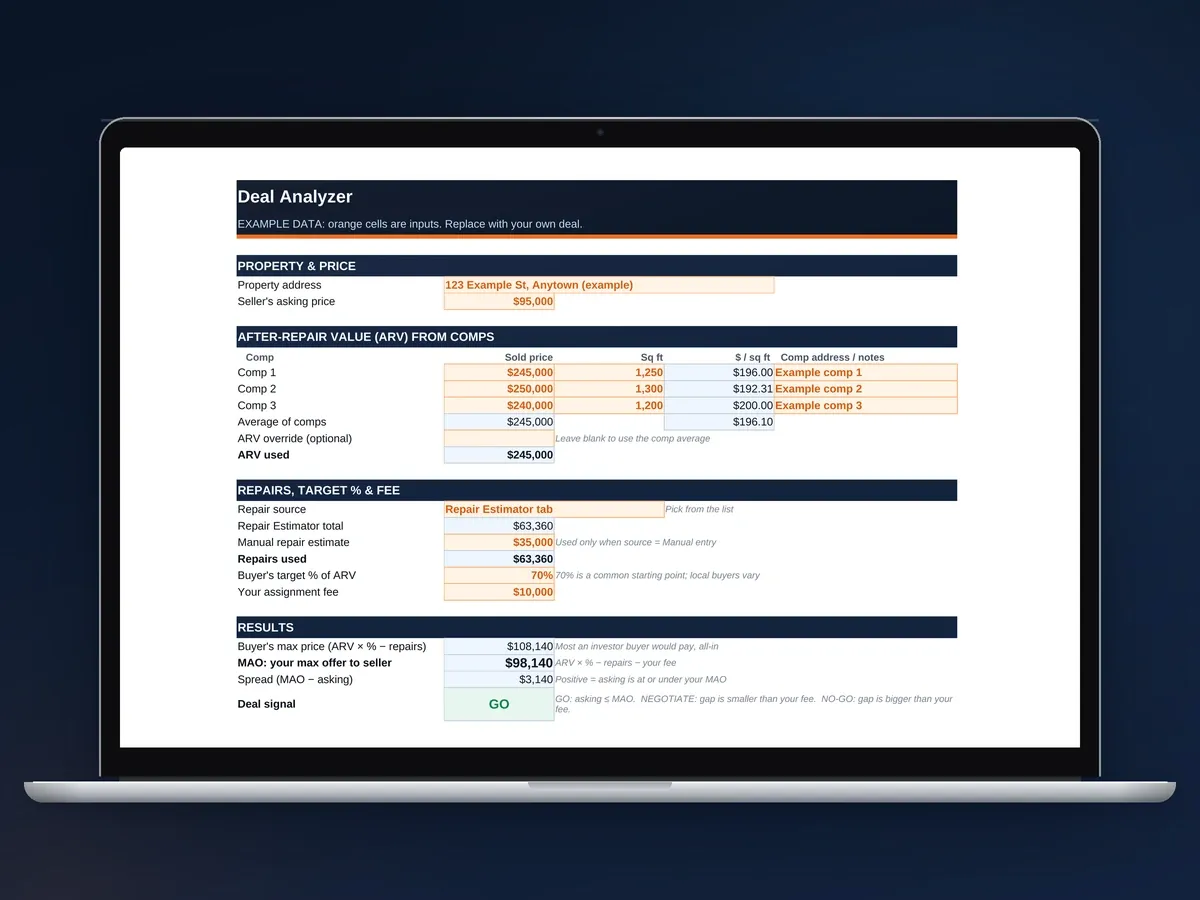
Every sheet below is filled with example data so you can see how it works. Replace it with your own deal.
How to use it, a color key for inputs and outputs, and the disclaimer.
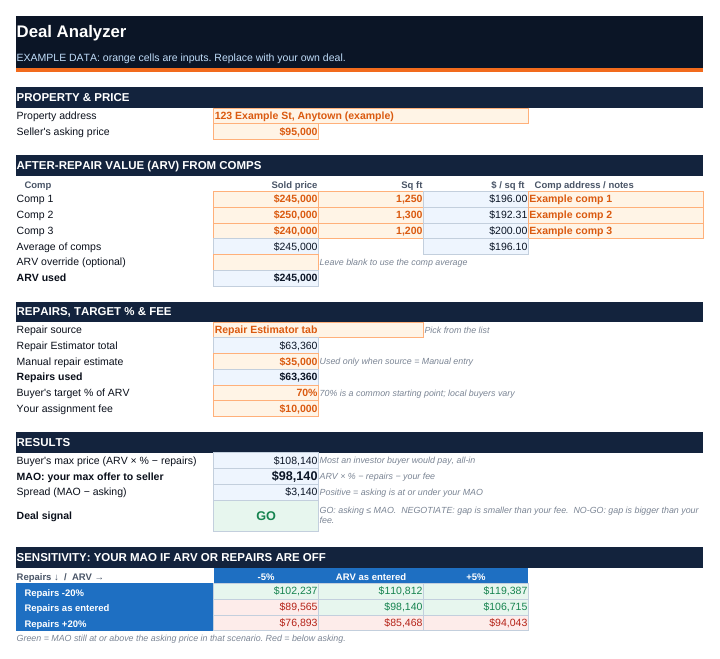
Asking price, 3 sold comps into ARV, repairs, your fee. Out comes your MAO and a GO / NEGOTIATE / NO-GO signal.
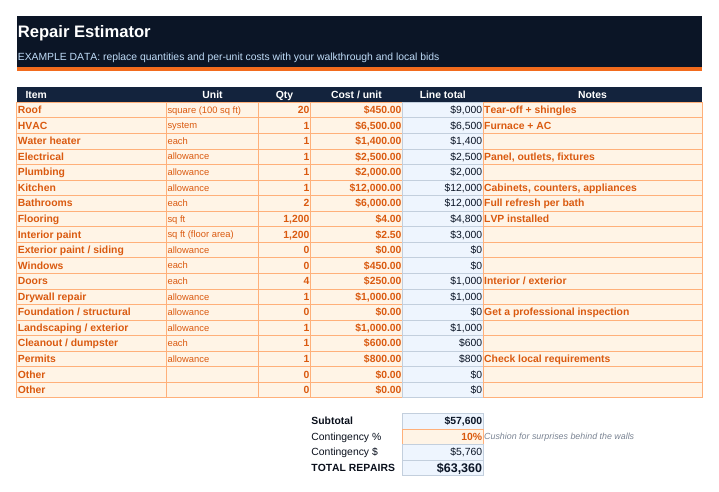
19 line items from roof to cleanout, each with quantity and cost, plus a contingency %.
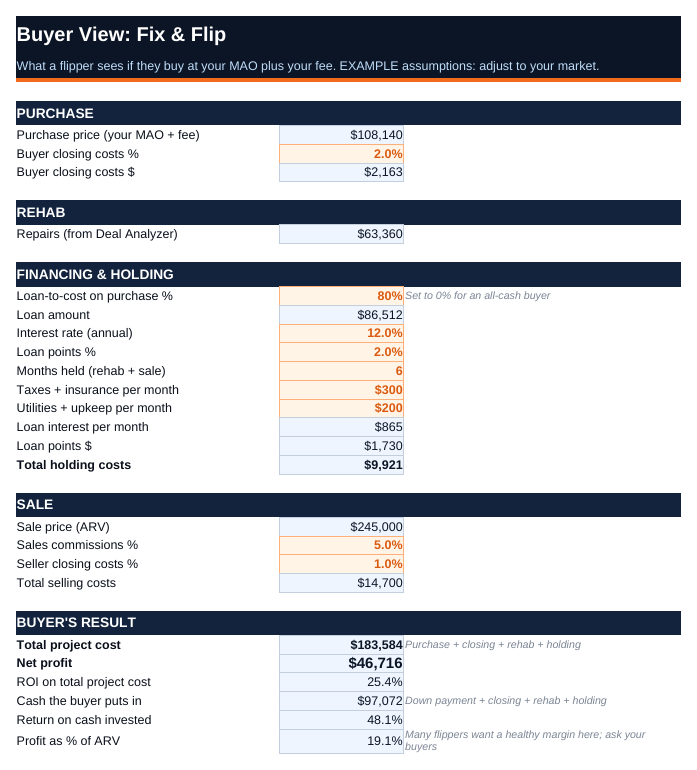
The deal the way a flipper sees it: rehab, holding, financing, selling costs, profit and ROI.
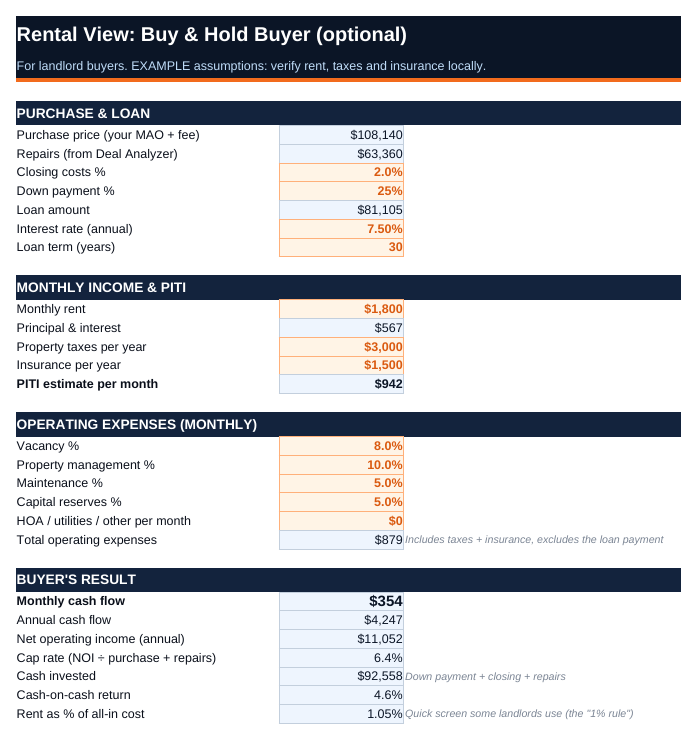
The deal the way a landlord sees it: PITI, expenses, cash flow, cap rate and cash-on-cash.
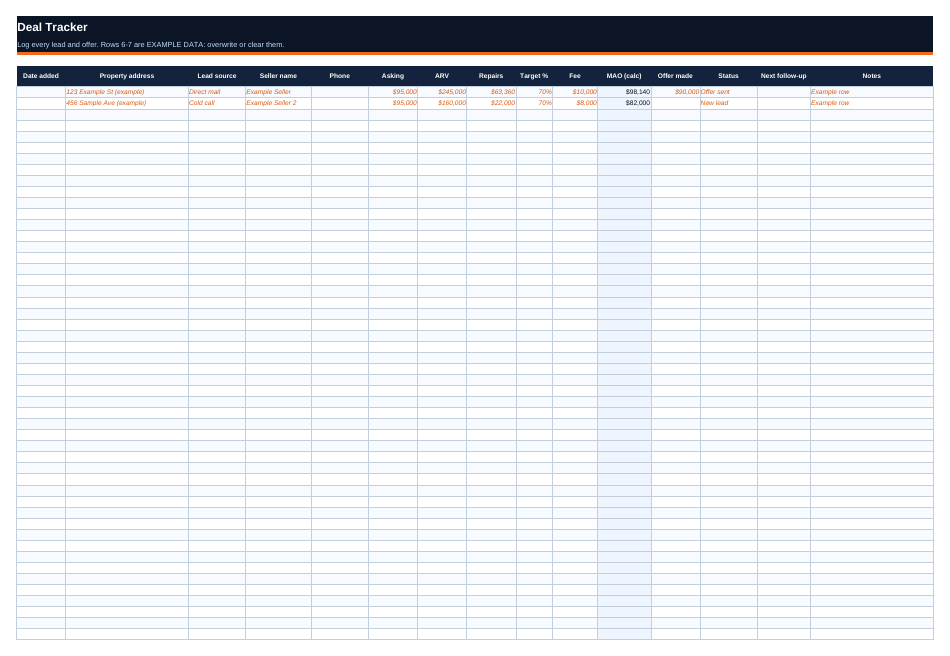
A 50-row log of every lead and offer, with an auto MAO, status dropdown and follow-up date.
Fill in the Repair Estimator as you go. Enter a quantity and a local cost for each item, add a contingency, and the total flows to the Deal Analyzer.
Type the asking price, up to 3 sold comps, your buyer's target % (70% to start) and your assignment fee.
The sheet shows your MAO, the spread against asking, and GO / NEGOTIATE / NO-GO. The sensitivity table shows what happens if ARV or repairs are off.
Your MAO (maximum allowable offer) is the most you can offer a seller and still sell the contract to a cash buyer with your fee on top. Here's the formula the spreadsheet uses:
MAO = ARV × buyer's % − repairs − your assignment feeBuyer's max price = ARV × buyer's % − repairs. Your fee comes out of that number, not on top of it.
The 70% rule: a fix-and-flip buyer pays no more than 70% of the after-repair value (ARV), minus repairs. The other 30% covers their closing, holding and selling costs and their profit.
70% is a starting point, not a law. Some buyers pay more, some want less. Ask the cash buyers you work with what number they use, and change the target % in the sheet to match.
ARV comes from comps: recent sold homes near the property, similar in size and type, in fixed-up condition. The sheet averages up to 3 of them and shows the price per square foot so you can spot an odd one.
| Sold comps: $245,000, $250,000 and $240,000 | ARV $245,000 |
| ARV × 70% (buyer's target) | $171,500 |
| Minus repairs (Repair Estimator, with 10% contingency) | − $63,360 |
| Buyer's max price | $108,140 |
| Minus your assignment fee | − $10,000 |
| MAO: your max offer to the seller | $98,140 |
| Seller's asking price | $95,000 |
| Spread (MAO minus asking) | + $3,140 |
| Deal signal | GO |
These are the made-up example numbers that come in the spreadsheet. They aren't a real deal or local pricing.
Show them the comps next to the repair list. It's easier to talk price when a seller can see what fixed-up houses sold for and what theirs needs to get there.
The numbers do the talking, so you don't have to argue.
Flippers and landlords look at the same house differently. The Buyer View shows a flipper's costs, profit and ROI. The Rental View shows a landlord's cash flow, cap rate and cash-on-cash.
Send each buyer the view that fits how they invest.
MAO stands for maximum allowable offer. It's the most you can offer a seller and still leave room for your cash buyer's profit and your assignment fee. The common formula is MAO = ARV × 70% − repairs − your fee. Offer more than that and the deal usually won't sell to a cash buyer.
The 70% rule says a fix-and-flip buyer should pay no more than 70% of the after-repair value, minus repairs. The other 30% covers their closing, holding and selling costs plus their profit. It's a starting point, not a law. Some buyers pay more and some want less, so ask your buyers what number they use.
Find three recently sold homes close to the property that match it: same type, similar size, beds and baths, in fixed-up condition. Add the sold prices and divide by three. Check the price per square foot too, so one odd sale doesn't throw it off. The spreadsheet does the averaging, and you can override the ARV if you know the area better.
Yes. It works in Excel, Google Sheets and LibreOffice. In Google Sheets, use File > Import, or upload it to Drive and open it. Google Sheets ignores Excel's sheet protection, so the formulas are editable there. Type only in the orange cells and leave the blue ones alone.
GO means the asking price is at or under your MAO. NEGOTIATE means asking is above your MAO, but by less than your fee, so there's room to talk. NO-GO means the gap is bigger than your fee. That's usually a pass, or a lower offer backed by your comps and repair list.
Yes. Enter your first name and email and I'll send it to you. No credit card and nothing to buy. You can unsubscribe from my emails anytime with one click.
Comps, repairs, your fee and your MAO on one sheet, plus the flipper and landlord views. Free.
Send me the Deal Analyzer
First name and email. The spreadsheet comes to your inbox.
A copy is on its way to . If it isn't in your inbox in a few minutes, check your spam folder.
Download the spreadsheet (.xlsx)Disclaimer: Estimates only. The Wholesale Deal Analyzer is an educational calculator, not legal, tax or financial advice, and the results depend entirely on the numbers you enter. Every number on this page and in the spreadsheet is an example. David Frizzell is a real estate wholesaler, not an attorney or financial advisor. Verify ARV, repair costs, taxes, insurance, closing costs and your local rules with local professionals before you make or accept an offer. Wholesaling laws vary by state.